Brand: AEG
Category: Home Appliances
Document Type: Manual
Language: EN
Brand: AEG
Category: Home Appliances
Document Type: Manual
Language: EN
Uploaded: April 20, 2026, 7:55 p.m.
Refer to the Warranty card included in the box for warranty details.
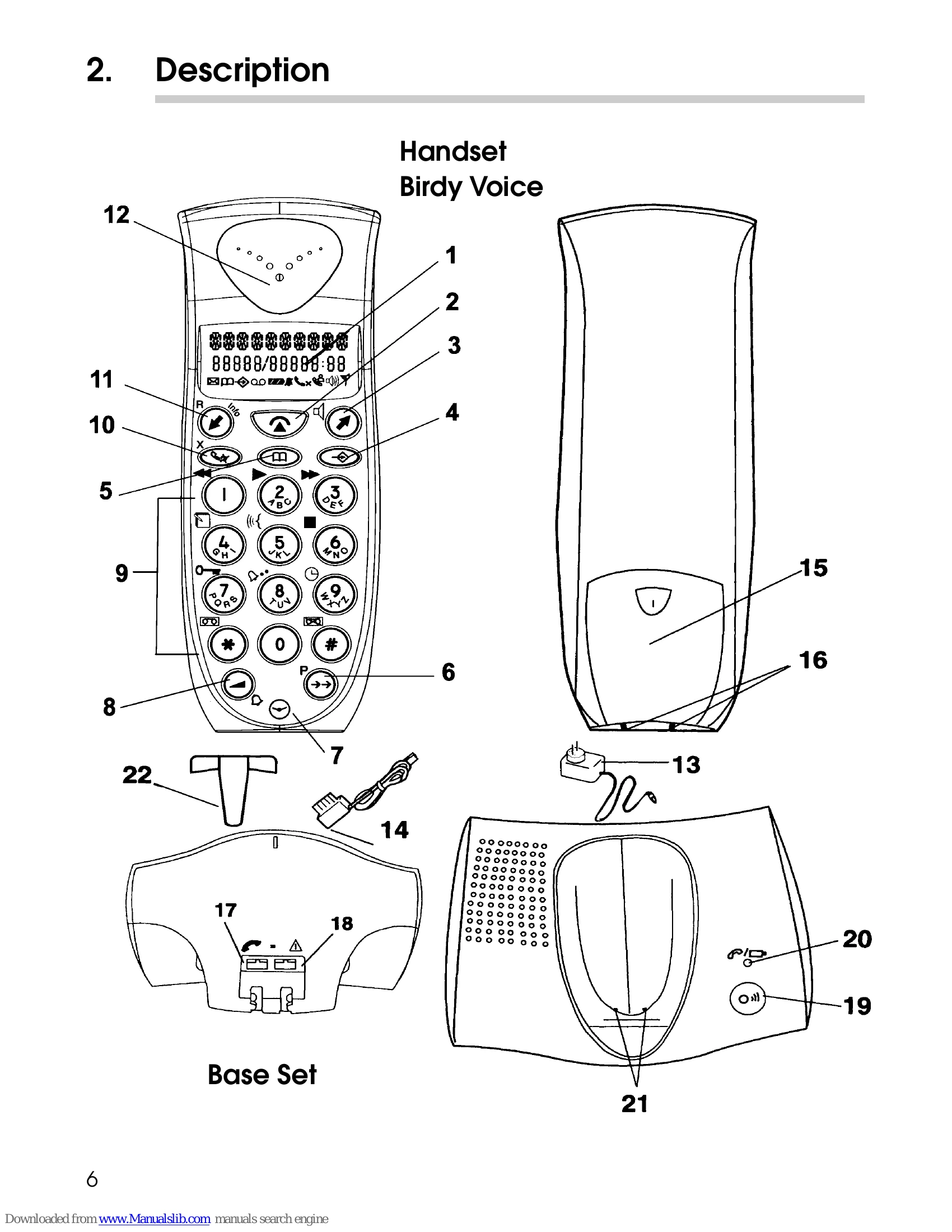
Power Supply: Charge the battery for at least 20 hours initially. Connect the power adapter to the base set and a power outlet. Install the handset on the base set.
Telephone Line: Connect the line cord to the base set and the wall outlet.
Switching Handset On/Off: Press the program key (4) to turn on. Navigate to POWER OFF using arrow keys and program key to turn off.
Subscribing Handset: Press and hold the page/subscribe key (19) on the base set, then follow on-screen prompts on the handset.
Selecting Base Set: Choose between automatic or manual selection through the SETTING menu.
Keypad Lock: Access KEY SETUP in the SETTING menu to lock/unlock the keypad, preventing accidental dialing.
Answering Machine: Access answering machine functions via the program key (4) twice. Features include message playback, recording, deleting, and remote control.
| Problem | Solution |
| No display. | Check battery connection. Install handset to charge. Remove and reinstall battery. |
| The battery is empty. | Check battery connection. Clean charge contacts. Recharge battery. |
| Weak battery warning. | Recharge the battery. |
| Handset does not find the base. | Move nearer to the base. Check base power supply. Subscribe handset. Reinstall battery. Disconnect/reconnect adapter. |
| No dial tone. | Check line cord connection. Increase speaker volume. |
| No dialling. | The number dialled is barred. |
| Forgotten PIN code. | Perform a full reset of the handset. |
| Bad voice quality (Birdy Voice only). | Speak slower and closer to the microphone. |