Brand: AEG
Category: Hobs
Document Type: Manual
Language: EN
Brand: AEG
Category: Hobs
Document Type: Manual
Language: EN
Uploaded: April 20, 2026, 8:11 p.m.
Please refer to the "Service" section for details regarding warranty service.
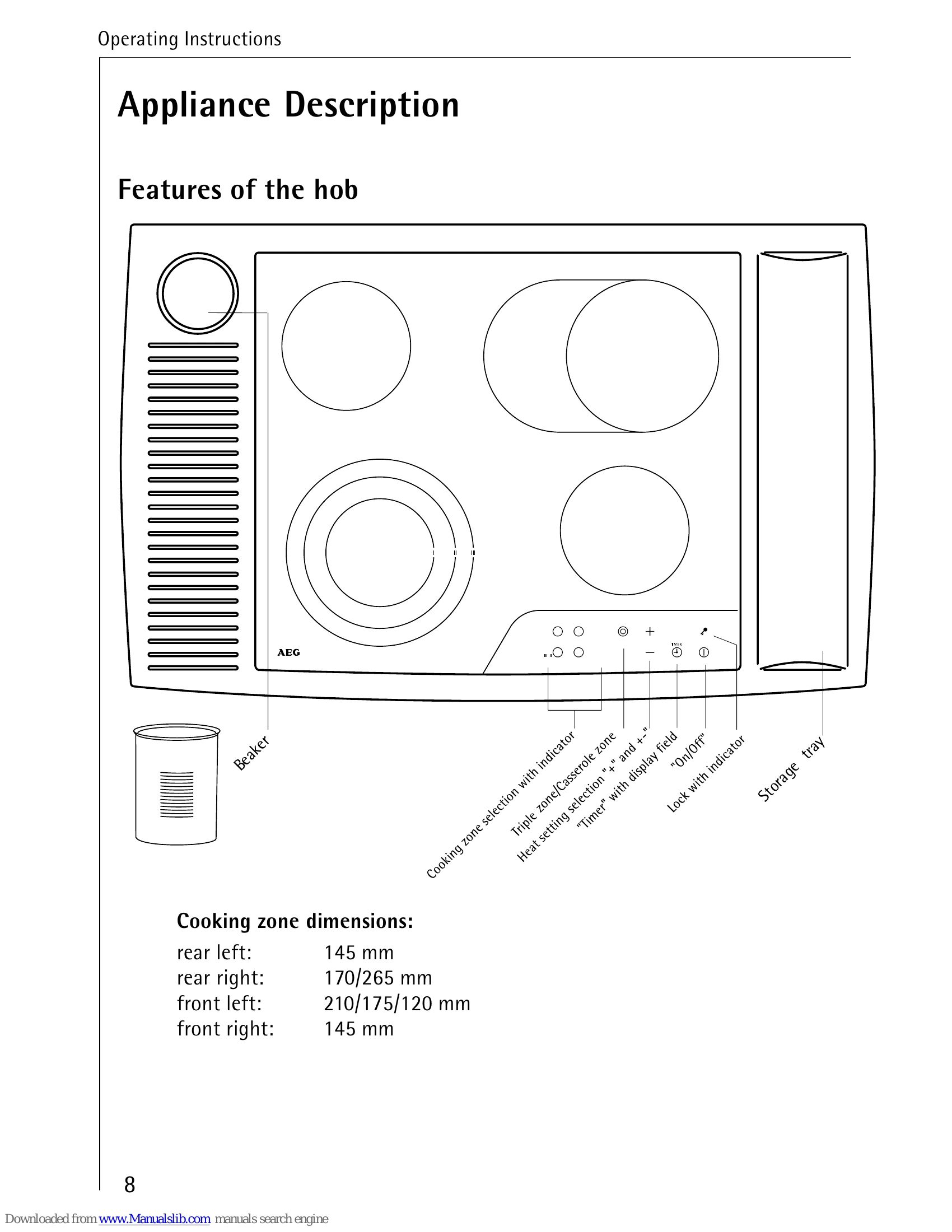
Switching On/Off: Use the main "On/Off" button for approximately one second to switch the appliance on or off. The "Heat Setting/Residual Heat" displays will illuminate when the appliance is on.
Zone Selection: Use the cooking zone selection buttons to choose the zone you wish to adjust. The decimal point in the display will show the selected zone.
Heat Setting: Use the '+' and '-' buttons to select a heat setting from 1 (lowest) to 9 (highest). The automatic warm-up function can also be activated with the '+' button.
Timer: Press the "Timer" button to activate the timer for a selected zone. Set the cooking time using the '+' and '-' buttons. The timer will automatically switch off the zone when complete.
Locking the Panel: Touch the lock button for two seconds to prevent accidental changes. Touch again to unlock.
| Problem | Possible Cause | Solution |
|---|---|---|
| Cooking zones do not function | Appliance not switched on | Check if the appliance is switched on. |
| Control lamps not on | Check if control lamps are on. | |
| Cooking zone not switched on | Ensure the respective cooking zone is switched on. | |
| Power level not set | Set the cooking zone power level. | |
| Blown fuses | Check household fuses; if they repeatedly trip, call an electrician. | |
| Safety cut-out tripped | Check if the safety cut-out has been tripped. | |
| Cooking zones cannot be switched on | Operating field is locked | Unlock the control panel. |
| Time delay after On/Off | Ensure there is less than 10 seconds between On/Off and zone selection. | |
| Touch surface issues | Ensure the touch surface is clean and dry; use light touch. | |
| Power failure | Touch switch affected by damp cloth or liquid. Touch operating field too soon after mains failure; switch fuse off/on. | |
| Displays all go out except 'H' (residual heat) | 'On/Off' accidentally operated | Check if 'On/Off' was accidentally operated. |
| Touch switches covered | Ensure touch switches are clean and dry. | |
| Displays suddenly go out | Electricity supply interrupted | Check electricity supply. |
| No 'H' displayed after switching off | Zone not hot enough | Zone may not have been in operation long enough. |
| Zone is hot | Call an approved electrician or Service Force Centre. | |
| Cooking zone cannot be switched off | Touch keys covered | Ensure touch keys are clean and dry. |
| Zone key active | Check if the corresponding cooking zone key is active (decimal point lit). | |
| 'F' shown in display | Connection issue | Isolate appliance from mains and check connection. |