Brand: AEG
Category: Audio Equipment
Document Type: Manual
Language: EN
Brand: AEG
Category: Audio Equipment
Document Type: Manual
Language: EN
Uploaded: April 20, 2026, 8:03 p.m.
Manual Publish Date: 2009-05-26
24-month warranty according to the guarantee declaration.
| Fault | Possible cause | Solution |
| The power supply light does not light | No power supply | WARNING: Before troubleshooting, switch the player off. Put the mains plug in correctly, if necessary, check the socket is working with another appliance. |
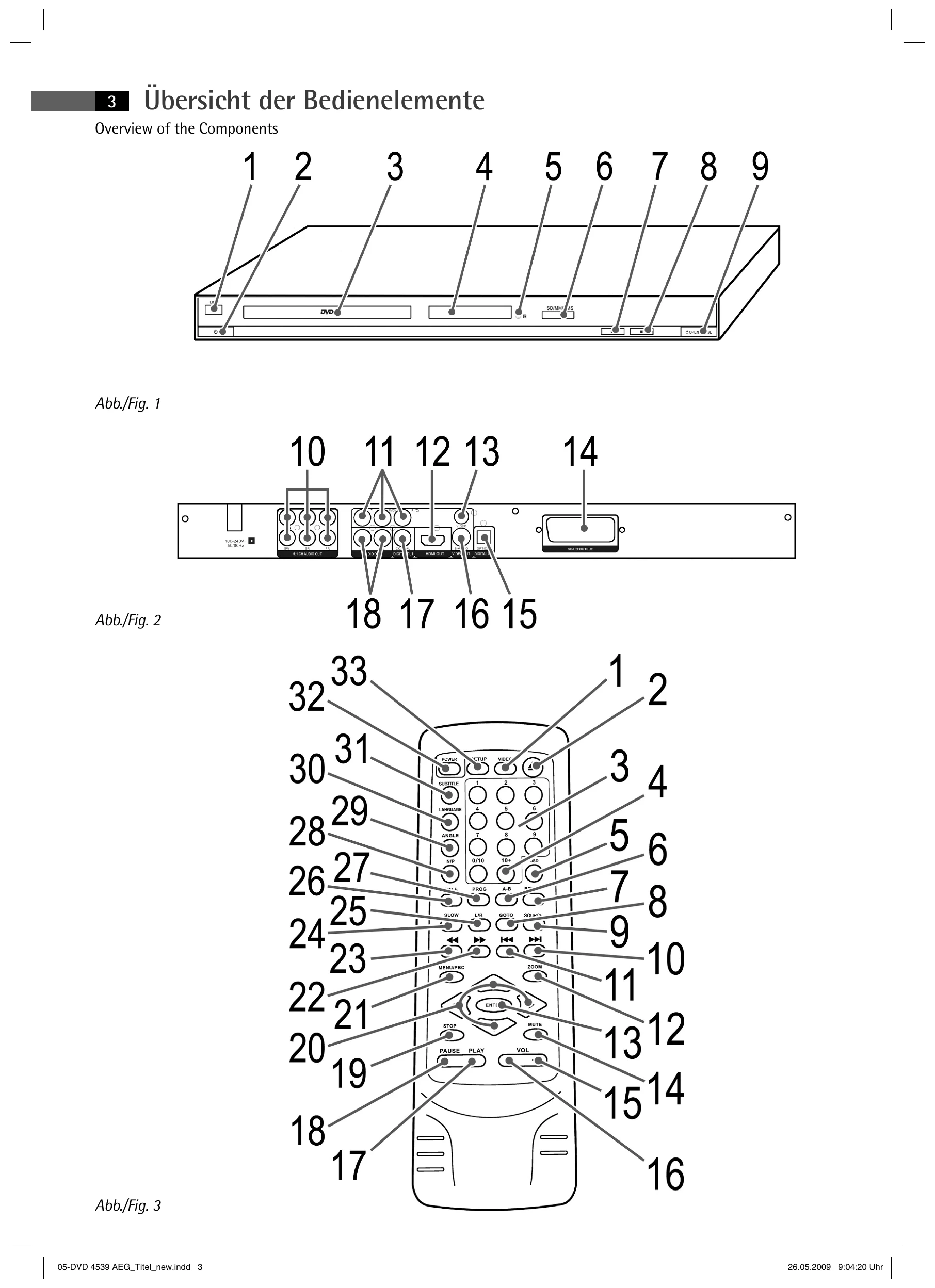
| No image displayed on screen | No power supply/ mains switch switched off | Switch the player on by the mains switch (Fig. 1/2). |
| Video cable not correctly connected | WARNING: Before troubleshooting, switch the player off. Check the correct fit of the Video cable → „Connecting the Video cable". Make sure that the jacks are tightly in the sockets. | |
| No response when pressing button | no DVD/CD inserted | Insert a CD/DVD. |
| DVD/CD not compatible | Use only compatible media (see ⇨ „Technical data“). | |
| DVD/CD incorrectly placed in CD/DVD-tray | Turn the CD/DVD around. | |
| CD/DVD is dirty | Clean the CD/DVD around. | |
| CD/DVD is damaged | Use a different CD/DVD. | |
| Incorrect settings | Check the settings of your DVD-Player. | |
| The child lock system is activated | Deactivate the child lock ⇨ „Parental control“. | |
| No sound | The wrong TV mode has been selected (no P-SCAN-capable playback device). | Press the VIDEO (Fig. 3/1) button in stop mode in order to change to TV mode. |
| Power supply problem or static charging of appliance | Switch off the main switch and pull out the mains plug. Insert the mains plug into the socket and switch the player on again. | |
| Audio cable not connected | WARNING: Before troubleshooting, switch the player off. Video plug for transmission of the Video signal, you must use and Audio cable in addition to the Video cable → „Connecting the Audio cable“. | |
| The remote control does not work | Amplifier switched off | If you use an amplifier for Audio output: check whether the amplifier is switched on. |
| Incorrect settings | Check the settings of your DVD-Player. | |
| wrong direction | The remote control is not pointed towards the DVD-Player. | |
| too far away | Make sure that the remote control is not further than 5 m away from the player. | |
| DVD cannot be played | Batteries empty | Replace the batteries in the remote control ⇨ „Remote control battery installation“. |
| DVD has not been finalized | Use a finalized DVD. |