Brand: Acer
Category: Other
Document Type: Manual
Language: EN
Brand: Acer
Category: Other
Document Type: Manual
Language: EN
Uploaded: April 20, 2026, 8:08 p.m.
Manual Publish Date: 2009-09-01
No explicit warranty period or summary found in the provided sections.
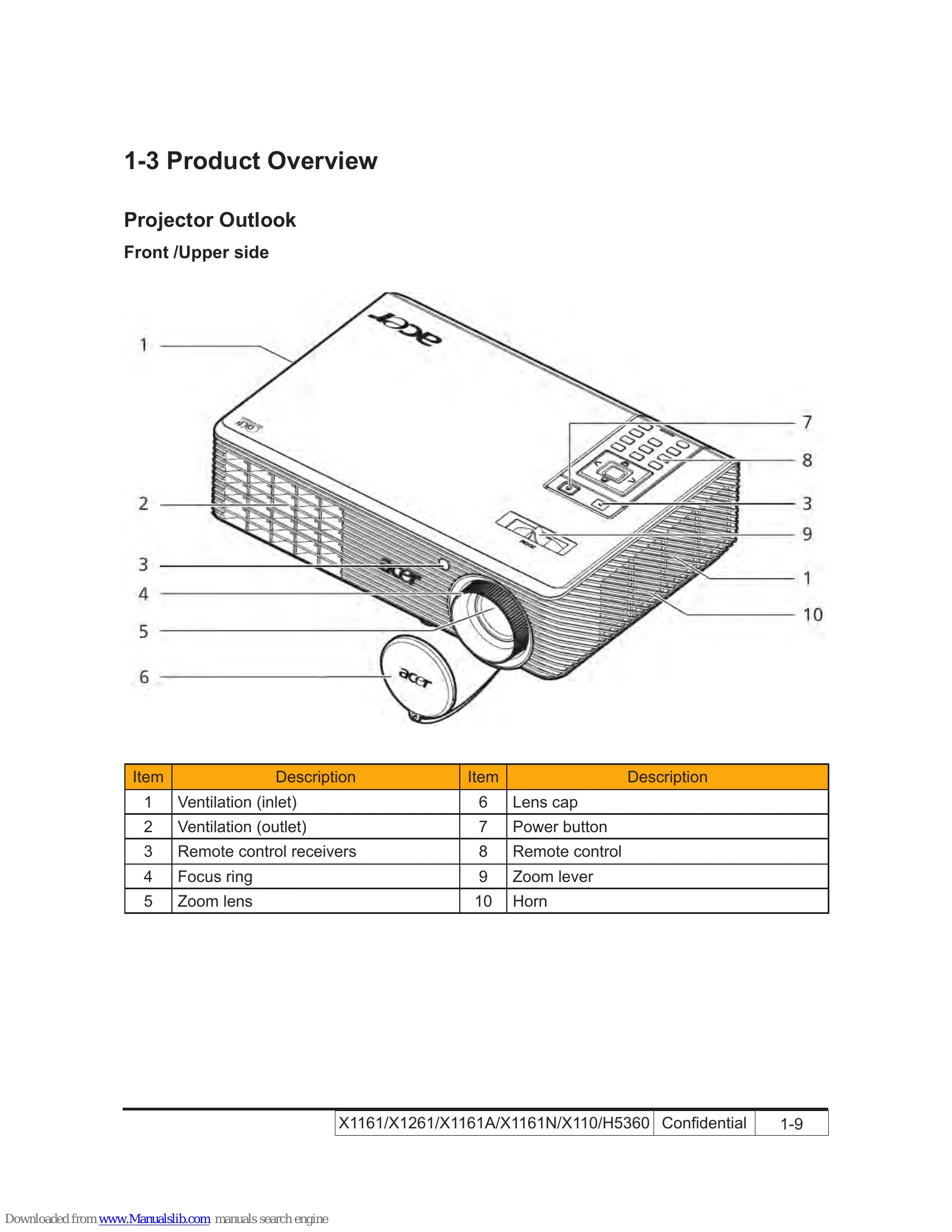
Front/Upper side
\n \n
\n | Item | Description | Item | Description |
|---|---|---|---|
| 1 | Ventilation (inlet) | 6 | Lens cap |
| 2 | Ventilation (outlet) | 7 | Power button |
| 3 | Remote control receivers | 8 | Remote control |
| 4 | Focus ring | 9 | Zoom lever |
| 5 | Zoom lens | 10 | Horn |
Rear side (for X1161/X1261/X1161A/X1161N/X110)
\n \n
\n Rear side (for H5360)
\n \n
\n  \n
\n | Item | Icon | Function | Description |
|---|---|---|---|
| 1 | Remote control receiver | Receives signals from remote control. | |
| 2 | POWER | Refer to the \"Turning the Projector On/Off\" section. | |
| 3 | MENU | Press \"MENU\" to launch the Onscreen display (OSD) menu, back to the previous step for the OSD menu operation or exit the OSD menu. Confirm your selection of items. | |
| 4 | KeyPad 0~9 | Press “0~9” to input a password in the “Security". | |
| 5 | KeyPad 0~9 | To choose the desired aspect ratio (Auto/4:3/16:9). | |
| 6 | RESYNC | Automatically synchronizes the projector to the input source. | |
| 7 | FREEZE | To pause the screen image. | |
| 8 | KEYSTONE | Adjusts the image to compensate for distortion caused by tilting the projector (± 40 degrees). | |
| 9 | Four directional select keys | Use up, down, left, right buttons to select items or make adjustments to your selection. | |
| 10 | ZOOM | Zooms the projector display in or out. | |
| 11 | SOURCE | Changes the active source. | |
| 12 | HIDE | Momentarily turns off the video. Press “HIDE” to hide the image, press again to display the image. | |
| 13 | Empowering key | Unique Acer functions: eView, eTimer, ePower Management. |
| No | Code (character) | Function feature |
|---|---|---|
| 1 | OKOKOKOKOK\r | Power On |
| 2 | * 0 IR 001\r | Power On |
| 3 | * 0 IR 002\r | Power Off |
| 4 | * 0 IR 004\r | Keystone |
| 5 | * 0 IR 006\r | Mute |
| 6 | * 0 IR 007\r | Freeze |
| 7 | * 0 IR 008\r | Menu |
| 8 | * 0 IR 009\r | Up |
| 9 | * 0 IR 010\r | Down |
| 10 | * 0 IR 011\r | Right |
| 11 | * 0 IR 012\r | Left |
| 12 | * 0 IR 014\r | Re-Sync |
| 13 | * 0 IR 015\r | Source Analog RGB for D-sub |
| 14 | * 0 IR 017\r | Source PbPr for D-sub |
| 15 | * 0 IR 018\r | Source S-Video |
| 16 | * 0 IR 019\r | Source Composite Video |
| 17 | * 0 IR 021\r | Aspect ratio 16:9 |
| 18 | * 0 IR 022\r | Aspect ratio 4:3 |
| 19 | * 0 IR 023\r | Volume + |
| 20 | * 0 IR 024\r | Volume |
| 21 | * 0 IR 025\r | Brightness |
| 22 | * 0 IR 026\r | Contrast |
| 23 | * 0 IR 027\r | Color Temperature |
| 24 | * 0 IR 030\r | Hide |
| 25 | * 0 IR 031\r | Source |
| 26 | * 0 IR 032\r | Video: Color saturation adjustment |
| 27 | * 0 IR 033\r | Video: Hue adjustment |
| 28 | * 0 IR 034\r | Video: Sharpness adjustment |
| 29 | * 0 IR 035\r | Query Model name |
| 30 | * 0 IR 036\r | Query Native display resolution |
| 31 | * 0 IR 037\r | Query company name |
| 32 | * 0 IR 042\r | Keystone Up |
| 33 | * 0 IR 043\r | Keystone Down |
| 34 | * 0 IR 046\r | Zoom |
| 35 | * 0 IR 047\r | e-Key |
| 36 | * 0 IR 048\r | Color RGB |
| 37 | * 0 IR 049\r | Language |