Brand: acer
Category: Mobile Phone
Document Type: Manual
Language: EN
Brand: acer
Category: Mobile Phone
Document Type: Manual
Language: EN
Uploaded: April 20, 2026, 7:59 p.m.
Manual Publish Date: 2015-03-01
Refer to the End User License Agreement for warranty information.
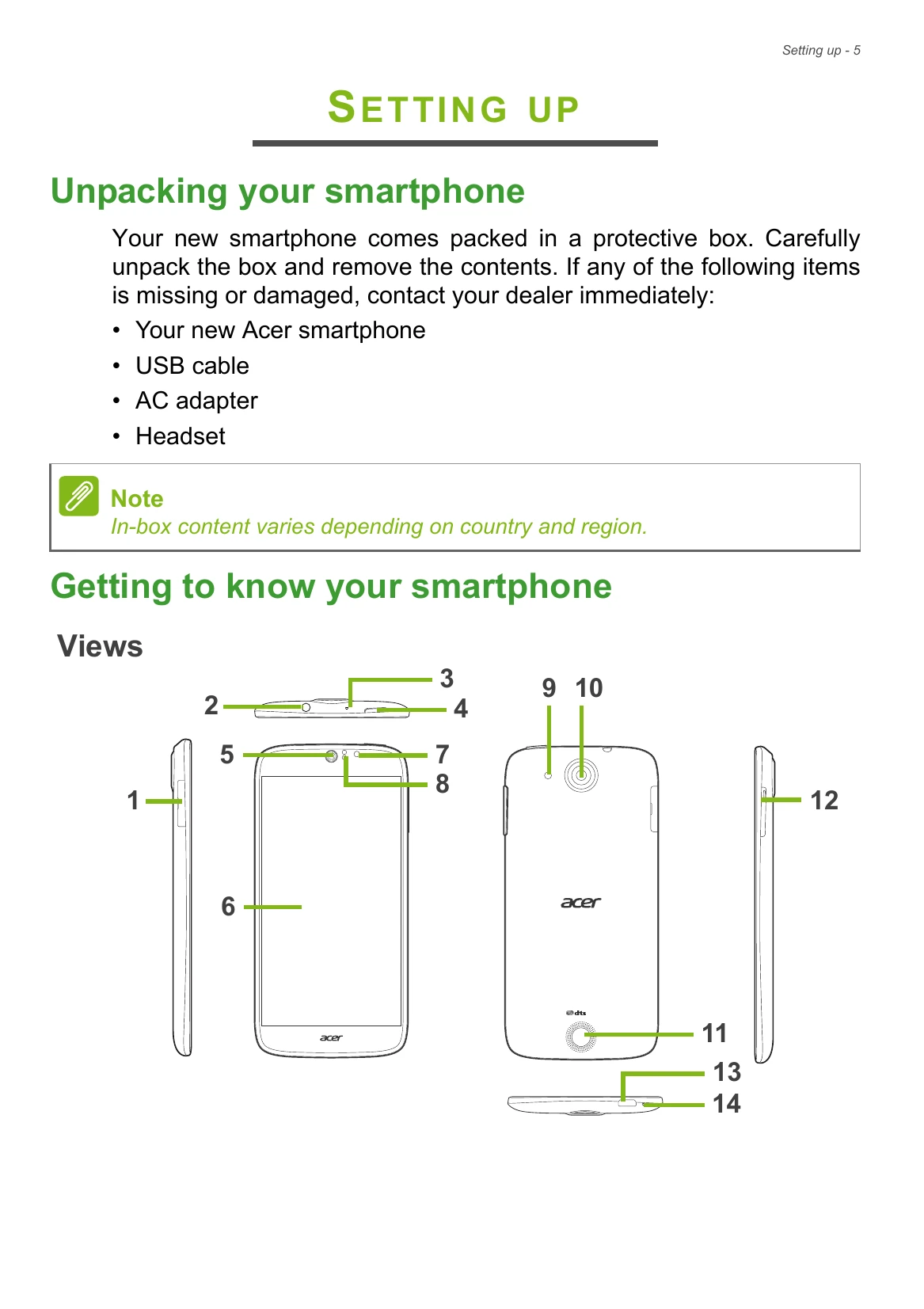
In-box content varies depending on country and region.
Note: Your smartphone can accept one nano SIM and one microSD card, OR two nano SIMs.
Important: Depending on your settings, you may be required to enter your PIN each time you switch on the smartphone function.
| Aspect | Question | Suggestions |
|---|---|---|
| Unlock pattern | I forgot my unlock pattern. | After a certain number of wrong entries, you will be presented with an option to reset your pattern. Tap Forgot pattern? and enter your Google account username and password. You must have an active Google account on the smartphone. Alternatively, you restore your smartphone to factory settings. See Restoring to factory settings on page 68. |
| Heat | The smartphone heats up when charging or making long duration calls. | It is normal for the smartphone to heat up when charging. When charging is complete, it will return to its normal temperature. It is also normal for the smartphone to heat up during long periods of use, such as watching a video or a long smartphone conversation. |