Basic Connections: Connect the AC power cord to the TV and then to the wall outlet. Set up the remote control by inserting AAA batteries.
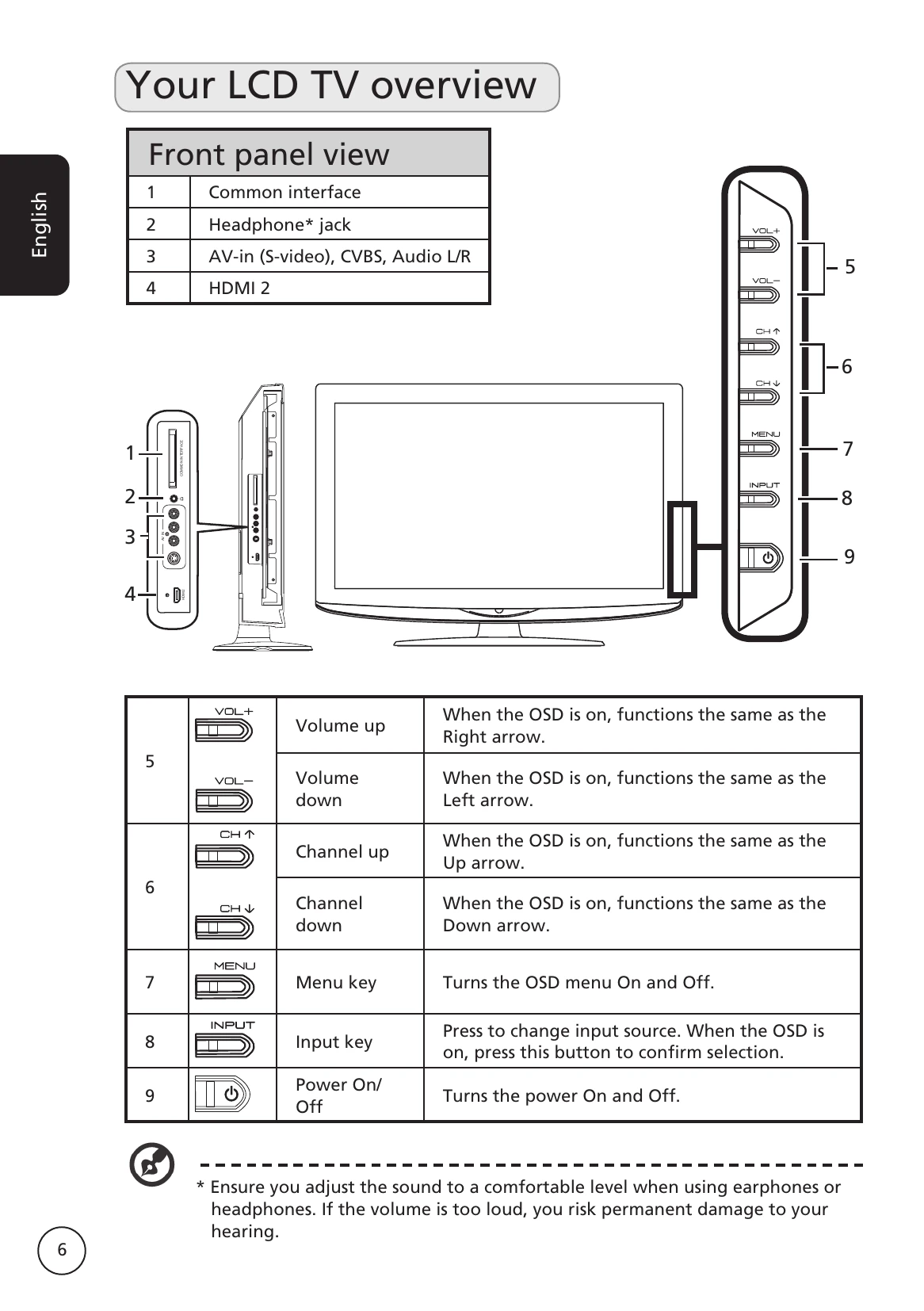
Enjoying TV: Connect an antenna or cable. Use the Setup Wizard to select language and scan for channels. Change channels using the number keys or CH +/- buttons. Adjust volume with VOL +/-.
Connecting External Devices: Connect DVD players, VCRs, STB, cameras, or computers using appropriate ports (SCART, HDMI, VGA, etc.). Select the correct input source using the remote control.
OSD Navigation: Use the MENU button to access On-Screen Display menus. Navigate through Picture, Audio, Channel management, Settings, and Advance menus using directional keys to adjust various settings.
Advanced Features: Explore Advanced Picture Adjustment, Parental Control, TV ratings, Channel list, Electronic Programme Guide, Sound effects, and Widescreen display modes.
Troubleshooting: Check power, input, antenna, volume, and remote control. Consult the manual for solutions to picture or sound issues.