Brand: ABB
Category: Drives
Document Type: Quick Start Guide
Language: EN
Brand: ABB
Category: Drives
Document Type: Quick Start Guide
Language: EN
Uploaded: April 20, 2026, 7:56 p.m.
Manual Publish Date: 2023-01-25
To control the drive with the adapter module, set the following basic parameters:
Validate and refresh parameters with 51.27 FBA par refresh.
Access the web page by typing the adapter module's IP address in a web browser (e.g., https://192.168.0.24/).
Log in with username 'admin' and password (last six digits of MAC address in uppercase, without hyphens).
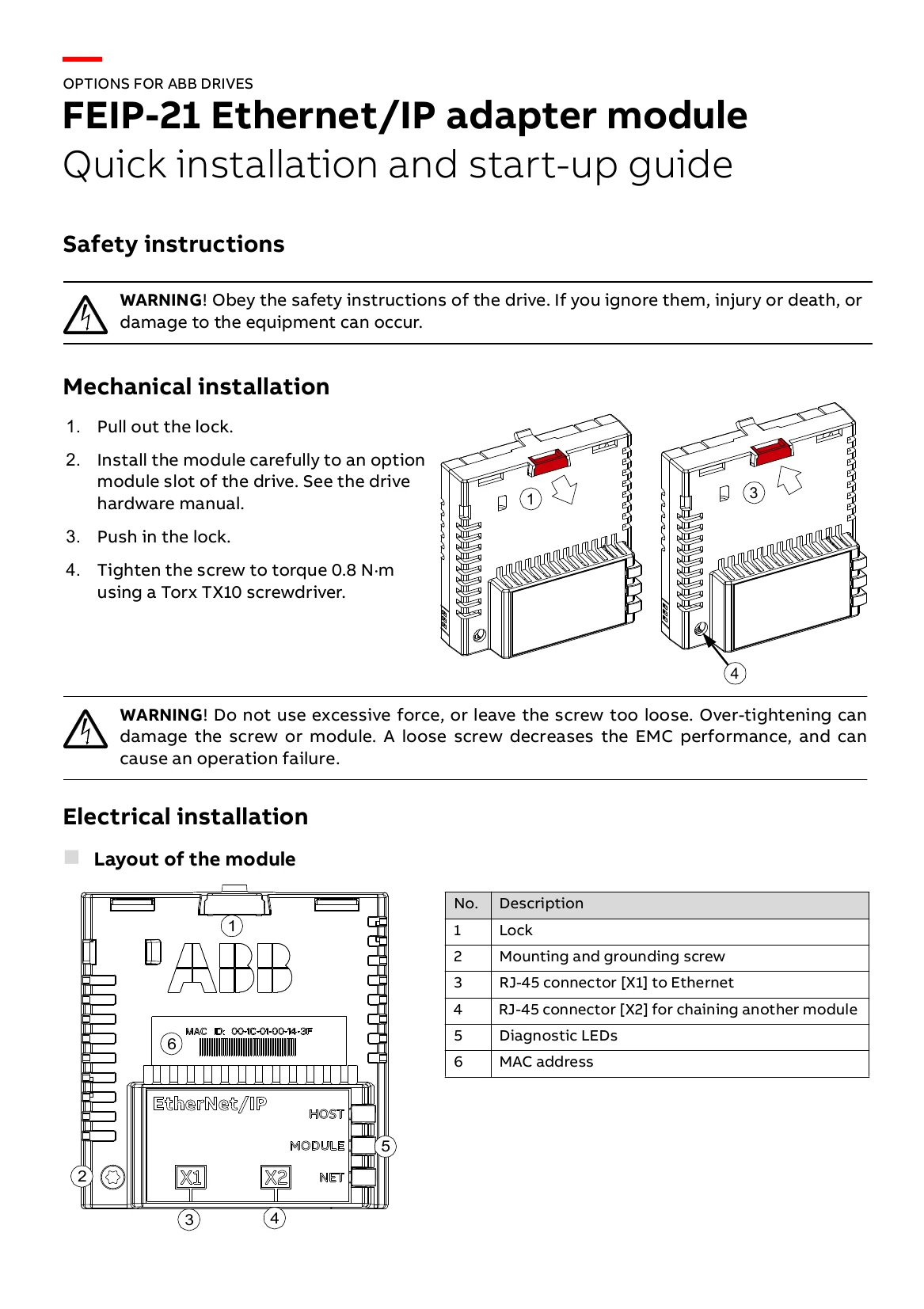
| No. | Description |
|---|---|
| 1 | Lock |
| 2 | Mounting and grounding screw |
| 3 | RJ-45 connector [X1] to Ethernet |
| 4 | RJ-45 connector [X2] for chaining another module |
| 5 | Diagnostic LEDs |
| 6 | MAC address |